AI clipping tools turned "repurpose your long video into Shorts" from a full-day editing job into a few clicks. Opus Clip is one of the best known — but if you post often, its free plan runs out fast. In this guide we look at why creators search for an Opus Clip alternative, what actually matters in a free clipper, and how ReelsClipper handles the job with no watermark and no credits.
Why creators look for an Opus Clip alternative
Opus Clip does have a free plan, but it comes with real limits. According to Castmagic's August 2026 pricing breakdown, the free tier gives you 60 processing minutes a month, adds a watermark to exports and keeps downloads for only 3 days. Paid plans start at $15 a month.
Credits are counted by the length of the video you upload, not by the clips you keep. As Pictory points out, uploading one 90-minute podcast can use up more than a month of free credits before you've picked a single clip.
So the three most common reasons people switch are:
- Watermarks on free exports
- Monthly minute limits that a single long episode can use up
- Uploading private videos to someone else's servers
What to look for in a free clipping tool
- No watermark — your clips should look like your brand, not an ad for the tool.
- AI moment detection — the tool should suggest clips, not just let you trim manually.
- Clean clip boundaries — clips that start mid-sentence feel broken. Look for clips that begin and end on full sentences.
- Auto captions you can edit — most people watch Shorts on mute.
- 9:16 reframing — with a fit-and-blur option for two-person podcasts.
- Batch export — one long video should become several clips in one go.
ReelsClipper: a free alternative that finds viral moments
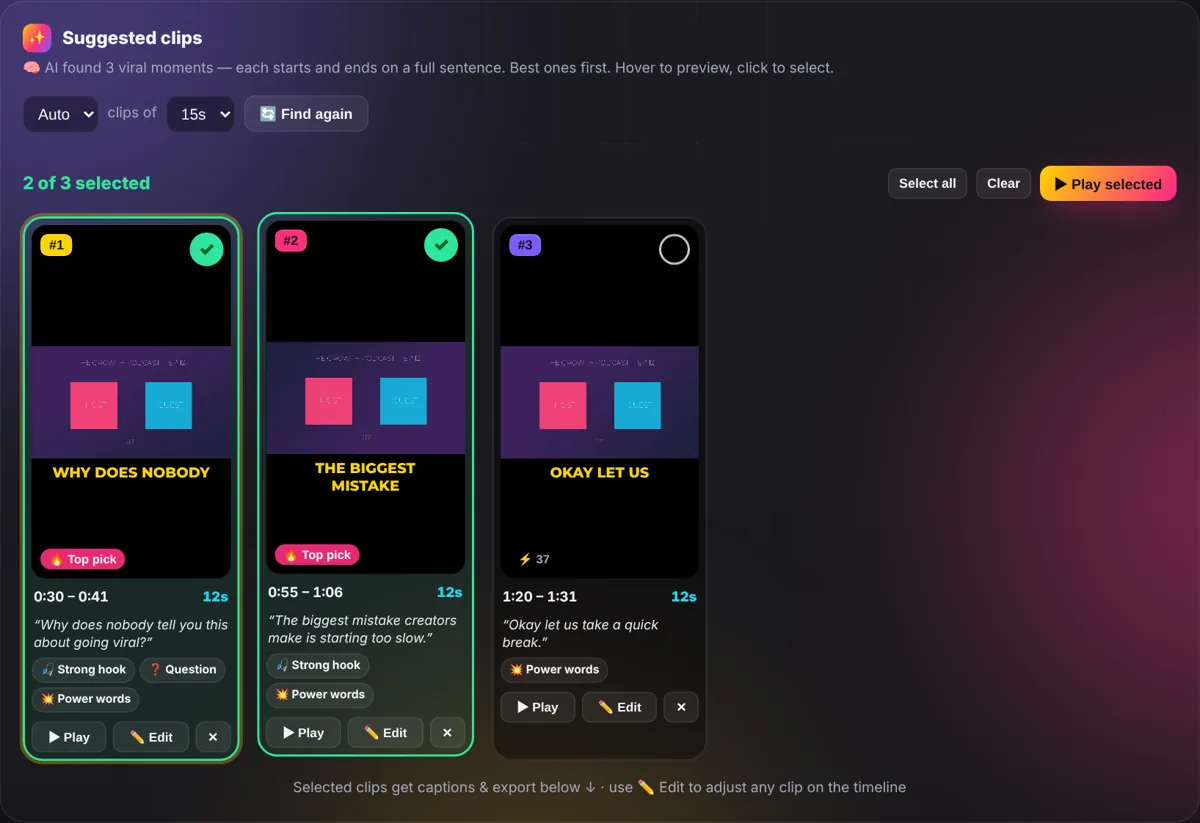
ReelsClipper is a free, browser-based AI clipper. You drop in a video and it instantly suggests the best moments as clip cards you can preview and select.
How it picks the moments
ReelsClipper's AI listens to your whole video and writes down what was said. Then it scores every possible clip on signals that tend to make short videos work:
- 🎣 Strong hooks — openings like "Why does nobody tell you…", "The biggest mistake…" or a bold number
- ❓ Questions that make viewers want the answer
- 💥 Power words — secret, mistake, million, crazy, truth and more
- 🔥 Energy — louder, more animated moments in the audio
- Complete thoughts — every clip starts and ends on a full sentence
The best candidates get a 🔥 Top pick badge, and every card shows its opening line so you know what it's about without pressing play.
How it compares
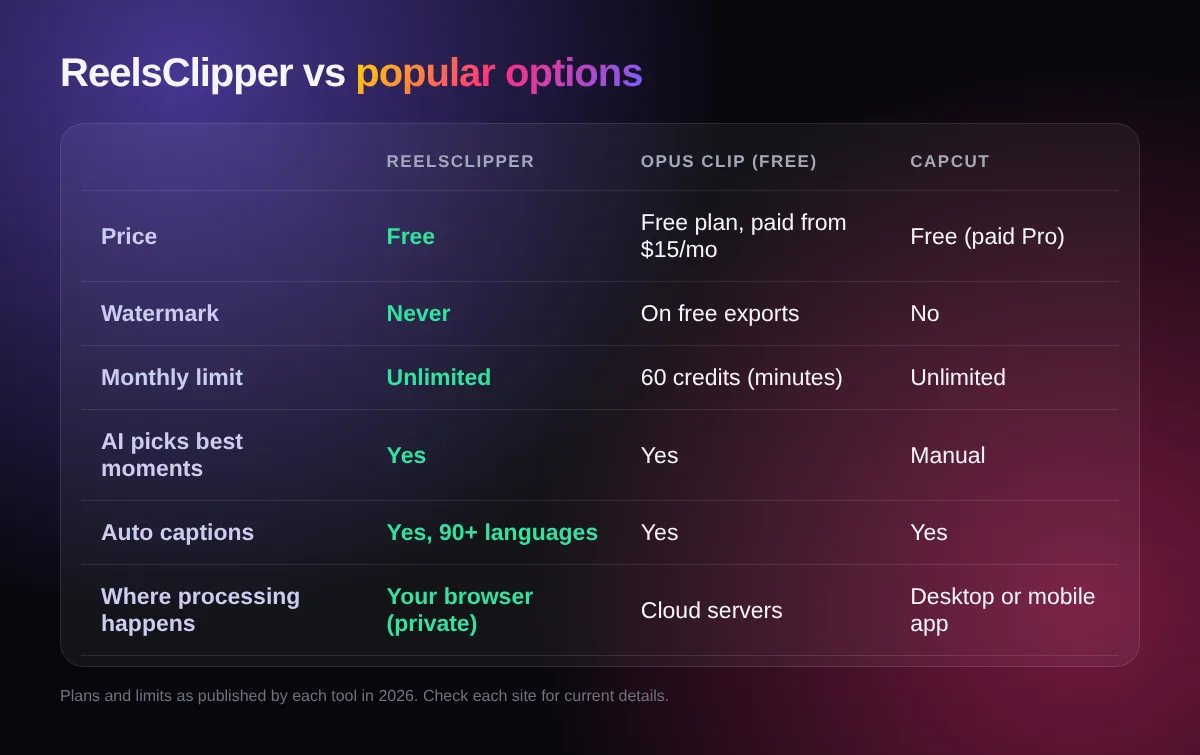
CapCut is another popular free option. It's a full video editor without AI moment detection — Ssemble's comparison notes you find and trim clips yourself. That's great for detailed edits, but slower when you just want clips from a long video.
Try it in 2 minutes
- Open the ReelsClipper tool and drop in your video.
- Wait a moment while the AI finds your viral moments. Quick picks appear right away while it listens.
- Hover over a card to preview it, and click the ones you like.
- Pick a caption style, then press Export selected clips.
Honest limitations
ReelsClipper runs on your own computer, which is why it's free and private. That also means:
- Long videos take a few minutes to scan, depending on your device.
- Desktop Chrome or Edge works best and exports MP4.
- The first scan downloads a small AI model (one time only).
If you need team workspaces or automatic social scheduling, a paid tool may still be worth it. For solo creators who want unlimited clips with no watermark, a free browser tool is hard to beat.
FAQ
Is ReelsClipper really free?
Yes. No sign-up, no watermark and no monthly minute limit.
Does it work for podcasts?
Yes — use the Fit + blur background layout to keep both speakers in frame. See our podcast to Shorts guide.
Can it add Urdu or Hindi captions?
Yes. Choose the spoken language and pick the Best accuracy model for cleaner results.
Try it now — it's free.
🎬 Open ReelsClipper